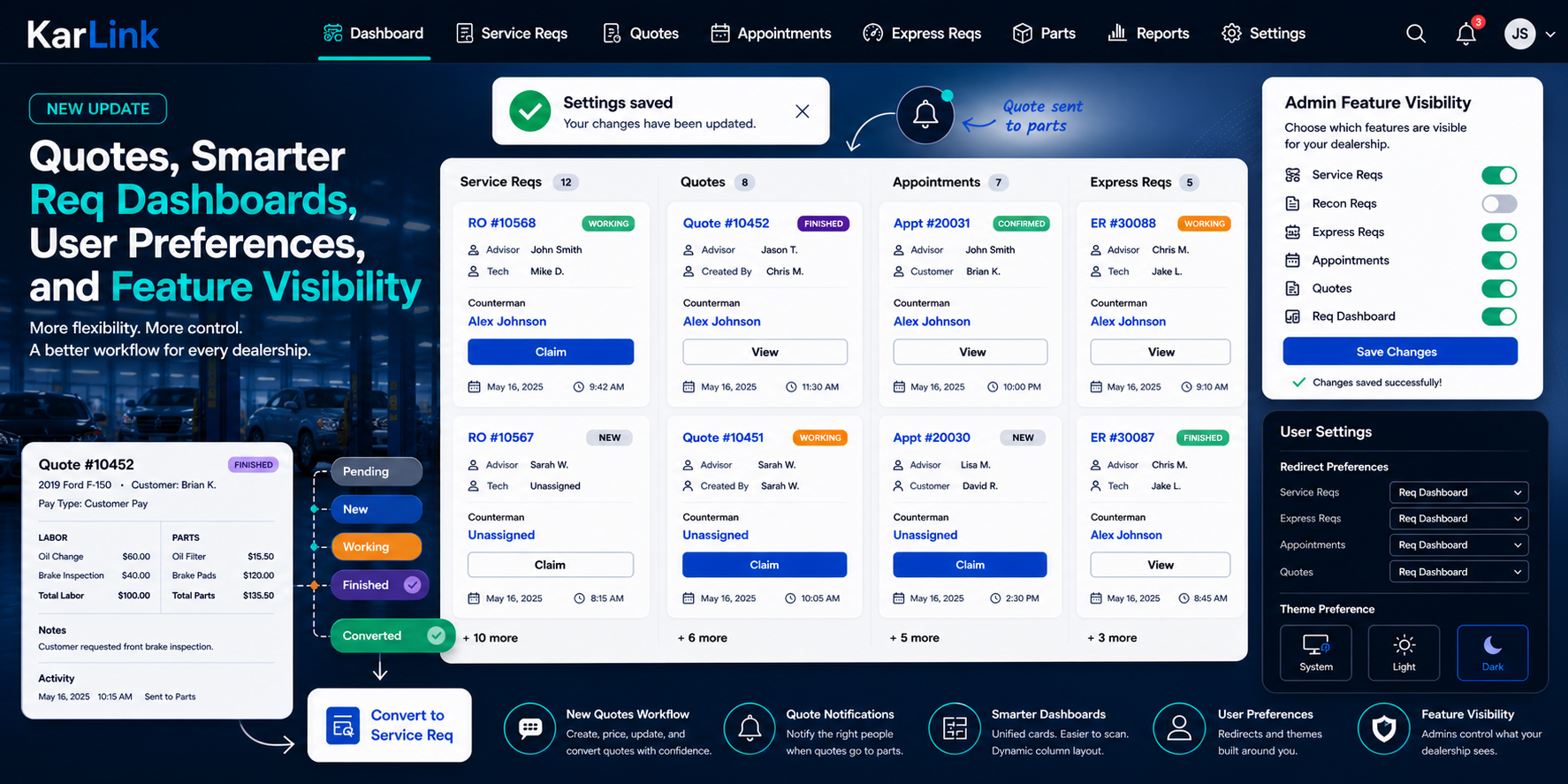
KarLink Update: Quotes, Smarter Req Dashboards, User Preferences, and Feature Visibility
KarLink has received a major update focused on making the req workflow more flexible, easier to scan, and better suited for each dealership’s operation.
This update started with the new Quotes feature, but it also includes improvements across Req Dashboard, recon reqs, user settings, admin controls, dark mode, and feature visibility.
New Quotes Workflow
The biggest new feature is Quotes.
Quotes give teams a dedicated place to create, price, update, finish, and convert quotes before they become a full service req or appointment.
Quotes now have their own workflow:
Pending
New
Working
Finished
Updating
Converted
A quote can include vehicle information, pay type, labor, parts, notes, and activity history. Once a quote is ready, it can be converted into a Service Req or Appointment while keeping the original quote record intact for tracking.
KarLink also tracks quote assignment more clearly. Quotes now support counterman assignment, pre-assigned indicators, assignment timestamps, and claim actions from Req Dashboard.
Quote Notifications
Quotes now send database notifications when they are sent to parts.
If a quote already has a counterman assigned, only that counterman is notified.
If the quote is unassigned, eligible countermen and parts managers at the dealership can be notified.
KarLink also prevents duplicate notifications when a quote has already been sent to parts and gets submitted again.
Req Dashboard Improvements
Req Dashboard received a major UI update.
Each column now uses a shared card design across:
Service Reqs
Recon Reqs
Appointments
Express Reqs
Quotes
The new cards are easier to scan. The record number and status are shown at the top. Advisor, created-by, and technician details sit under the record number. Counterman assignment is separated in the main card body. Date and time are stacked cleanly at the bottom.
Claim buttons now stand out with a stronger blue style, while normal View actions remain neutral. Unassigned counterman text is highlighted in blue so claimable work is easier to find.
The dashboard also adjusts its desktop column layout dynamically. If an admin hides Recon Reqs or another feature, the dashboard no longer stays locked into a five-column layout. It automatically uses the number of visible columns.
Recon Reqs Moved Into Service Reqs
Recon Reqs are no longer maintained as a separate duplicated workflow.
They now live inside Service Reqs using an is_recon flag.
This keeps service and recon workflows aligned while still allowing KarLink to distinguish between normal service reqs and recon reqs. Recon-specific views and navigation now use the same underlying req structure, which makes future maintenance cleaner.
Admin Feature Visibility
Admins can now hide dealership features they do not use.
For example, if a dealership does not have a recon department, an admin can hide Recon Reqs from that dealership.
This works alongside subscription-based feature access. Super admin subscription settings determine what a dealership is allowed to use, while dealership admins can hide enabled features they do not need.
Admin feature visibility changes now show a reusable toast confirmation when saved.
User Settings and Redirect Preferences
KarLink now has the beginning of a user settings system.
Users can choose where they want to go after completing certain workflows.
Redirect preferences now support:
Service Reqs
Express Reqs
Appointments
Quotes
Users can choose destinations like the main index, their own reqs, or Req Dashboard where available.
If a user selects Req Dashboard but the dealership later disables it, KarLink safely falls back to the correct index page.
Theme Preferences
User Settings now includes theme preference support.
Users can choose:
System
Light
Dark
Dark mode support has been improved across the app, including navigation, dropdowns, Req Dashboard cards, Express Req cards, forms, buttons, and shared components.
This also creates the foundation for custom themes and future Super Admin theme management.
Express Req Mobile UI
Express Reqs received a mobile card redesign.
The mobile layout is cleaner, wider, easier to read, and no longer causes unwanted horizontal scrolling.
Status colors were also adjusted so New, Working, and Finished are easier to distinguish.
What This Means
This update makes KarLink more flexible at three levels.
Users can personalize where they go after finishing work.
Admins can control what features their dealership sees.
Super admins can continue building toward subscription-based feature access and future theme management.
Most importantly, the req workflow is becoming more unified. Quotes, recon reqs, express reqs, appointments, and service reqs are now easier to scan, easier to manage, and better connected across the system.
Leave a Reply